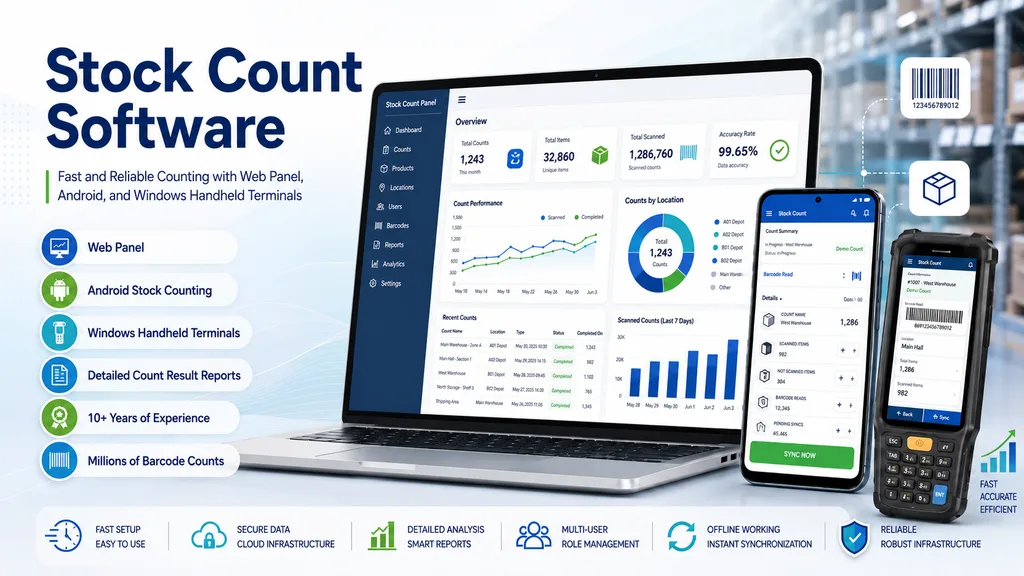
Stock Taking Software: Fast Counting and Detailed Reporting with Android Handheld Terminals and Camera
When counting day arrives, teams wander the aisles for hours, jot notes on paper, then key the data into the system one by one. Errors are inevitable. What's more, these errors quietly erode a significant portion of annual revenue. Stock Sayım Analiz software breaks this cycle: it lets you perform fast physical counting with an Android handheld terminal or smartphone camera, then make data-driven decisions with detailed reports. In this article we cover how this software — proven in the field with millions of barcode counts over nearly 10 years — works and which reports it produces. You'll also see which sectors it serves.
What Is Stock Taking Software and Why Is It Necessary?
Stock taking software is a tool that lets businesses count their physical products and compare them with the stock data in their system, automating the counting process and significantly reducing the risk of error. It makes inventory management both visible and sustainable. We covered the fundamental logic of the process step by step in our guide on what stock counting is and how it's done.
But what does the picture really look like? A significant portion of small businesses still rely on manual stock tracking. This method not only wastes time; manual processes pave the way for considerable losses in annual revenue. Typos, overlooked products, incorrect transfers — they all add up and inflate the bill.
A stock tracking program steps in at exactly this point: thanks to instant data collection through barcode scanning, automatic comparison, and reporting, counting time is also shortened considerably.
How to Do Stock Counting with an Android Handheld Terminal?
Stock Sayım Analiz software works directly with handheld terminals running the Android operating system. It scans the product with an Android phone camera or the handheld terminal's barcode reader, and the data is transmitted to the system instantly. The process works the same way on market shelves, in warehouse aisles, or in the stockroom of a clothing store.
From what we've observed in the sector, professional counting teams strongly prefer the handheld terminal in intensive operations. The reason is simple: a handheld terminal is hardware designed for field conditions. With its drop-resistant casing, long battery life, and laser-based fast scanning engine, it leaves the limits of a smartphone far behind.
Advantages of Using a Handheld Terminal
- Durability: Industrial casings provide protection against field conditions like drops and dust.
- Battery life: Offers uninterrupted operation across long shifts without worrying about charging.
- Scanning speed: Laser or 2D imager readers scan barcodes much faster and from a greater distance than a camera.
- Multi-shift use: The same device can be used by different team members; it's ideal for large warehouse counting operations and stock counting firms.
Stock Counting with an Android Camera: A Fast Solution Without Extra Hardware
You don't have to buy an extra device. The Android phone or tablet already in your hand is enough for the job. The Stock Sayım Analiz app turns the device's camera into a barcode reader; the extra hardware cost is zero.
On supported devices, the app can read multiple barcodes at once — which directly increases counting speed. For a small grocery store, a boutique clothing shop, or a business still in its growth phase, this mobile stock counting app is an extremely practical starting point. It's possible to reach professional counting quality while keeping the initial investment to a minimum.
So which should you choose? For fast-paced, multi-staff, high-volume operations, the handheld terminal is more efficient; for small teams or single-store owners, a camera-based solution is both sufficient and economical.
Count Result Reports: The Foundation of Data-Driven Decisions
Finishing the count doesn't mean finishing the job. The real value lies in analyzing that data correctly. When counting is complete, Stock Sayım Analiz software produces comprehensive stock count reports and exports them in TXT, CSV, or Excel format. Transfer to existing accounting or ERP systems is completed in just a few steps.
Which Report Types Are Available?
- Count variance analysis: Shows the differences between recorded stock in the system and the physical count; makes it easier to detect shrinkage, theft, or record errors.
- Stock valuation report: Calculates the total value of current stock; supports balance sheet and accounting processes.
- Section / category-based report: Provides count results broken down by shelf, warehouse zone, or product category; quickly reveals which area is problematic.
- Price-filtered report: Generates output filtered by specific price criteria; enables priority tracking of high-value products.
What we see in practice is that these reports don't just look at the past. A count result report that shows which product ran low and when, and where losses occurred, also directly influences the next ordering decision. Without the right report, there's no right ordering decision.
Proven Experience: Reliability Backed by Millions of Barcode Counts
Millions of barcodes. Thousands of completed counting projects. Uninterrupted field experience built up over the years. Throughout this process, Stock Sayım Analiz software has been the choice across a wide spectrum — from supermarket chains to clothing stores, from small tradespeople to professional stock counting firms. This scale represents a depth of experience that few software solutions in the sector have reached.
Thanks to its cloud-based infrastructure, data is stored securely and authorized users can access the system from wherever they want. Software updates are applied automatically; there's no extra installation or maintenance burden. This accumulated experience means fewer errors and faster delivery on every new counting project.
Who Can Use It? Sector-Specific Use Cases
The software is structured to respond to the different needs of different sectors.
How long does counting day take in a grocery store? For supermarkets, this question directly determines operational efficiency. Shelf counting and shrinkage detection are among the most critical points of grocery store stock counting operations. Each shelf section is counted separately; with the variance report, losses become visible instantly.
Season changes trigger the busiest counting period for clothing stores. Clothing stores ease this pressure thanks to the software: size- and color-based barcodes are scanned quickly, and end-of-season reports are ready within minutes.
Proven by experience: firms running counts for multiple clients at once struggle most with managing multiple projects. Stock counting firms benefit directly from the software's flexible reporting structure at this point. The same platform can be used from a small business to a large chain store; its scalable structure makes this flexibility possible.
Conclusion
With its flexible counting options via Android handheld terminal or camera, comprehensive reporting tools, and field-proven reliability, Stock Sayım Analiz software accelerates and secures businesses' stock processes. The time loss and revenue risk brought by manual counting are left behind with the right software choice.
Try Stock Sayım Analiz software; start counting right away with your Android device, or request a demo to explore the software up close.